
What is a Router and how it works?
Think of a router as your network’s traffic director – the essential device that connects computers, phones, and smart devices so they can communicate.
Your home Wi-Fi hub? That’s a router! It’s your front door to the internet, linking your phones, laptops, and smart devices to the outside world.
That is just the beginning.
What really happens when you hit ‘send’? We’re cracking open router operations layer by layer.
What is a Router for?
At its core, a router’s fundamental mission is routing traffic—shuttling packets between distinct networks. But modern routers are far more than simple couriers.
What makes a Router so “special”?
While hardware provides the muscle, it’s the software the brains behind routing performance.
It’s no coincidence that Cisco is the industry leader in routing and switching. Any vendor can throw RAM or CPUs at a router. But Cisco’s secret sauce is how IOS (and its variants) orchestrates hardware.
And let’s be real – few things beat the nerdy adrenaline rush of nailing a Cisco config. That show ip route output? Pure art.
Here you can find a list of all available Cisco router models.
How does a Router work?
Routers operate at Layer 3 of the OSI model – the “Network Layer.
By working at this layer, it means that they work with IP addresses, the unique identifier for every device in a network.
Ready to peek under the hood? Understanding how routers actually move data will transform you from a user into a network expert. Let’s decode the magic.
A router builds a “routing table” which contains the path to all the networks it knows about.
Step 1: Building the Map
Routers create a routing table — their internal map that lists the best paths to reach various networks. Think of it like Google Maps, but for directing data.
Step 2: Learning the Routes
Routers learn paths in two main ways:
- Static Routes
These are manually configured instructions, like fixed road signs saying, “To reach Network X, use Path Y.”
→ Simple and reliable in small networks, but not ideal for large, changing environments. - Dynamic Routes
These use routing protocols like OSPF or EIGRP to automatically exchange information with other routers — like using Waze for real-time traffic updates.
→ This method supports large-scale, complex networks — including the internet. - The fastest routes
- Alternate (backup) paths
- Less congested routes
Routing packets
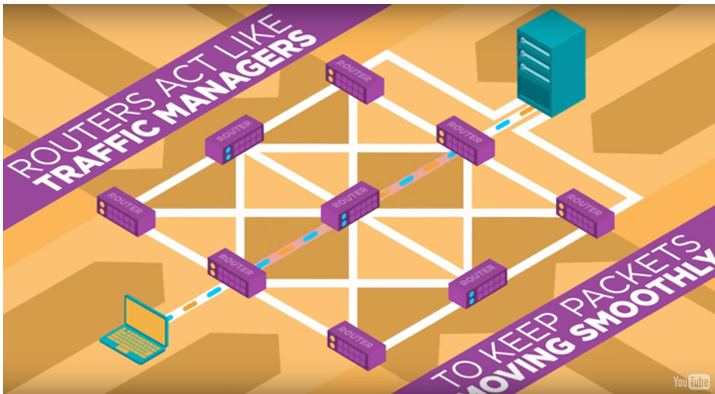
Once the router has learned routes through static or dynamic routing, what comes next is how a router will treat packets based on that routing table.
When a router receives a packet through any of its interfaces, it does the following:
- The router examines the Layer 2 header and looks for the destination MAC address, then it confirms that it is its own, therefore, copies the frame into its buffer. If not: Ignores it.
- Then, it examines Layer 3 header which means that it looks for the destination IP address and first it consults directly connected networks to send the packet through that interface, if there is no match, it will search in the routing table for a network that includes the destination IP address.
- If the router finds the network in its routing table, looks for the next-hop and sends the packet through that peer. If it does not find any, it will drop the packet.
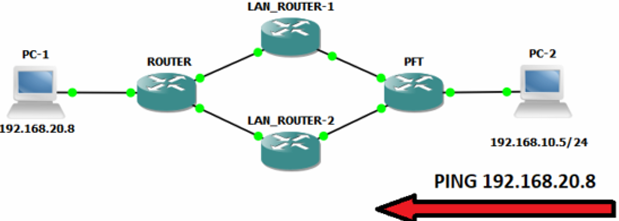
But what happens if a router knows how to get to a host through different paths?
In a redundant network, it is very likely that your router will know how to get to a network through different paths (See Figure 1.0).
When this happens, the router must choose only one route and install it in its routing table, but it will only install the best one.
How will it do so?
- The router will look at the AD (Administrative Distance) of learned routes (Assuming they all have the same prefix length). The lower the AD, the better.
- If the AD of all learned routes ties up, it will then break the tie by looking at the lowest metric value of all those routes.
But… what if the AD and metric value is the same for all those routes?…
Since it can only install the best route in its routing table, it will install them all (all those with the same AD and metric value) and will do load balance on packets between those N routes.
See the next example.
Place For _Tech#show ip route
Codes: C - connected, S - static, R - RIP, M - mobile, B - BGP
D - EIGRP, EX - EIGRP external, O - OSPF, IA - OSPF inter area
N1 - OSPF NSSA external type 1, N2 - OSPF NSSA external type 2
E1 - OSPF external type 1, E2 - OSPF external type 2
i - IS-IS, su - IS-IS summary, L1 - IS-IS level-1, L2 - IS-IS level-2
ia - IS-IS inter area, * - candidate default, U - per-user static route
o - ODR, P - periodic downloaded static route

Gateway of last resort is not set

D	192.168.20.0/24 [90/156160] via 10.0.0.10, 00:02:27, GigabitEthernet0/1
			[90/156160] via 10.0.0.6, 00:02:27, GigabitEthernet0/3
			[90/156160] via 10.0.0.2, 00:02:27, GigabitEthernet0/2
	10.0.0.0/30 is subnetted, 3 subnets
C	   10.0.0.8 is directly connected, GigabitEthernet0/1
C	   10.0.0.0 is directly connected, GigabitEthernet0/2
C	   10.0.0.4 is directly connected, GigabitEthernet0/3
C	192.168.1.0/24 is directly connected, GigabitEthernet0/0
As you can see, there are 3 EIGRP routes learned and installed in the routing table.
The first value after the network (192.168.20.0/24) is the AD, EIGRP AD value is 90.
All three routes have the same AD, so, the next tie breaker is the metric, it is the value right next to the AD, 156160.
Since all three routes have identical metrics, the router installs them all and load-balances traffic for the destination network across the three paths.
Concepts you need to know.
AD is a value set by the vendor of how “reliable” a type of route is, for example:
Cisco defines the EIGRP routes with an AD of 90, OSPF routes with an AD of 110, RIP routes with an AD of 120 and BGP routes with an AD of 20.
The metric value is the result of how a routing protocol calculates the path to a network, you can associate it to something like the “cost” to get to it.
So… what now?
At this point, we have covered the basic function of a router.
Needless to say that there are tons of other functions Routers do, but that depends on what you configure on them.
I hope you find this post useful. Feel free to leave a comment down below with your thoughts about it.