
What is a Switch Virtual Interface?
Getting into the world of Layer 3 switches, one of the first few concepts that we get to know is the SVI (Switch Virtual Interface).
It is a virtual interface, meaning, it’s logical, no physical port is related to it, although it works as one, both Layer 2 & Layer 3.
An SVI is usually the gateway for end devices belonging to that broadcast domain defined by the VLAN.
It performs Layer 3 routing for packets that belong to the VLAN, meaning we can configure most of the Layer 3 features (IP, ACL, QoS, etc.) on these interfaces.
interface Vlan10
ip address 192.168.10.254 255.255.255.0
end
Why would I use an SVI?
These virtual interfaces have multiple functions; the most important ones are listed down below:
- Provide network connectivity to the switch.
- Routing between VLANs by providing a default gateway.
- Supports routing protocols
- Faster than a layer 3 physical port.
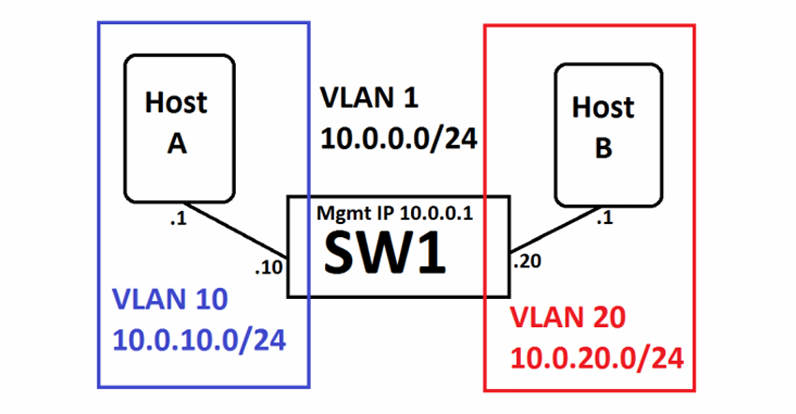
Cisco IOS & SVI
Cisco Catalyst switches (both Layer 2 and Layer 3) have a default SVI for VLAN 1 and it acts as the management VLAN for that switch.
Configure an IP address on this interface to enable remote access to the switch via Telnet or SSH.
Each SVI automatically maps to its corresponding VLAN—for example, interface VLAN 1 maps only to VLAN 1.
For an SVI to be displayed as up/up it is necessary that:
- That the VLAN exists in the VLAN database of the switch.
- At least one port (trunk or access) is active for that VLAN.
- That the SVI is not administratively down.
How to configure an SVI
First things first, to configure an SVI, we have to create the VLAN first.
We can confirm if the VLAN is or is not already in the VLAN database by running the command show vlan brief and show vlan id <VLAN>.
Switch#show vlan brief

VLAN Name                             Status    Ports
---- -------------------------------- --------- -------------------------------
1    default                          active    Fa0/1, Fa0/2, Fa0/3, Fa0/4
                                                Fa0/5, Fa0/6, Fa0/7, Fa0/8
                                                Fa0/9, Fa0/10, Fa0/11, Fa0/12
                                                Fa0/13, Fa0/14, Fa0/15, Fa0/16
1002 fddi-default                     act/unsup
1003 token-ring-default               act/unsup
1004 fddinet-default                  act/unsup
1005 trnet-default                    act/unsup
If the VLAN is not created yet, simply run the command VLAN<#> in the configuration mode and it will be created (see below).
VLAN and SVI configuration.
Switch#configure terminal
Switch(config)#vlan 10
Switch(config-vlan)#name Place_for_Tech
Switch(config-vlan)#exit
Switch(config)#interface vlan 10
Switch(config-if)#ip address 192.168.10.254 255.255.255.0
Switch(config-if)#no shutdown
Switch(config-if)#exit
Switch(config)#ip routing
Don’t forget to run the command “ip routing” if it’s the first time you’re configuring it with an SVI.
Run the show vlan brief command again to confirm VLAN creation and verify its assignment to a switchport.
How to configure an access switchport with a new VLAN.
Switch#configure terminal
Switch(config)#interface Fa0/1
Switch(config-if)#switchport mode access
Switch(config-if)#switchport access vlan 10
Run the show vlan brief command again to see it has been created and assigned to a switchport.
Switch#show vlan brief

VLAN Name                             Status    Ports
---- -------------------------------- --------- -------------------------------
1    default                          active    Fa0/2, Fa0/3, Fa0/4, Fa0/5
                                                Fa0/6, Fa0/7, Fa0/8, Fa0/9
                                                Fa0/10, Fa0/11, Fa0/12, Fa0/13
                                                Fa0/14, Fa0/15, Fa0/16
10   Place_for_Tech                   active    Fa0/1
1002 fddi-default                     act/unsup
1003 token-ring-default               act/unsup
1004 fddinet-default                  act/unsup
1005 trnet-default                    act/unsup
Run the show ip interface brief command and you should see something like this (Status and Protocol should be up).
Switch#show ip interface brief
Interface                  IP-Address      OK? Method Status                    Protocol
Vlan1                      unassigned      YES manual administratively down     down
Vlan10                     192.168.10.254  YES manual up                        up
Done! You can now use the VLAN 10 SVI to enable network communication.
Now you understand what a Switch Virtual Interface (SVI) is, how it functions, and how to configure it on Cisco devices.
Feel free to leave a comment to contribute to this post.